SEE Better.
The workflow command center for DaVinci Resolve teams.
Hours of card work,
handed back
Checksum-verified offload with an explicit safe-to-eject. Originals are never modified.
Additive onlySay what you want in plain language and the indexed library returns the shot.
Local transcriptionArchive. Recolor.
Index. Finish.
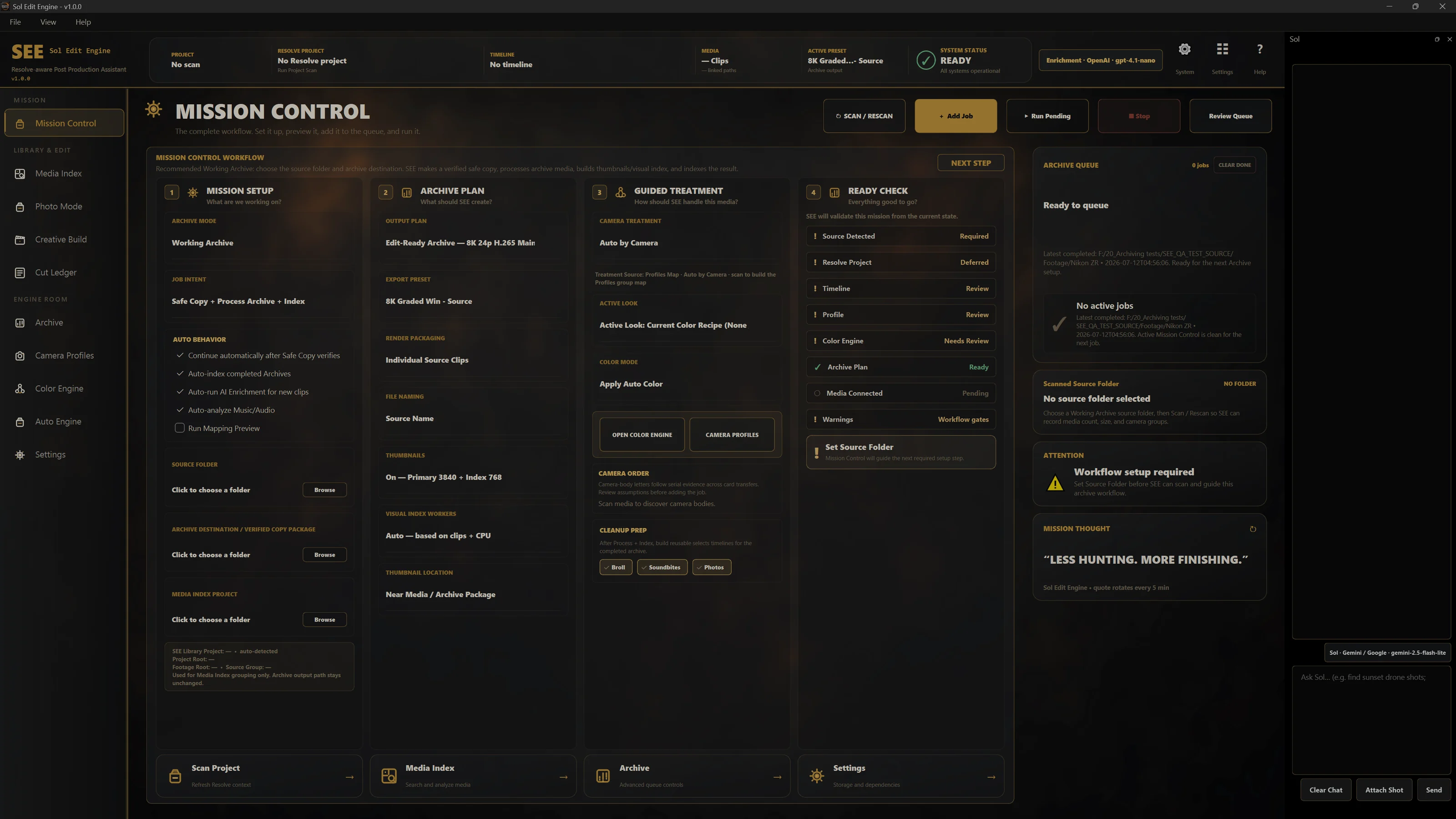
Four jobs. Everything else in SEE is one of these four, done more carefully.
Archive
Card in, checksum-verified copy out, filed into your folder structure — not somebody else's.
Recolor
Camera-aware RAW decode and auto-color to edit-ready, scene matched, on a film-finish node pipeline.
Index
Every clip transcribed and described locally, so the whole library answers a plain-language question.
Finish
Selects and proposed cuts land in a queue. You approve. Then it builds in Resolve.
SHIPPED SOFTWAREBUILT FOR THE REAL JOB
Follow one shoot through the system SEE is already shipping
Beyond the
suggested cut
Most tools arrive after the footage is already copied, organized, prepped and understood. SEE starts at the camera card and keeps going until a human-approved timeline is sitting in Resolve.
One task inside post
- Waits for the media to be prepared first
- Suggests edits from clips you already selected
- Leaves offload, folder discipline, color and approvals to the team
- Stops before the rest of the workflow is done
Camera card to approved timeline
- Verifies the offload and leaves originals untouched
- Builds your folder structure and a searchable local index
- Prepares camera-aware color, selects, proposals and FCPXML recipes
- Routes every build, render and publish through human approval
Open only what
you care about
The long version lives in here.
One archive job, step by step
queued running done
Source and destination
Set the card or footage folder as the Source, then set the Project Destination.
Choose the intent
Safe Copy + Process Archive + Index when the card is the only copy.
Process Archive + Index when the footage is already protected.
Scan, then Ready Check
Review detected camera groups, treatment, look and export preset before anything runs. Problems surface here, not halfway through the night.
Add Job, Run Pending
If Safe Copy pauses after verification, hit Continue Processing when you are ready
for archive and index.
Selects accumulate
Dated daily plus running master B-roll, Soundbite and Photo selects, with FCPXML recipes. A new run adds a daily and updates the master. It will not overwrite a selects timeline you edited.
Approval stays human
Approving a proposal queues a Creative Build card. Nothing renders, publishes, uploads or deletes until a person runs it.
Every screen in the app
Set up, validate, queue and run archive jobs.
Watch folders, schedules, budget caps, and the Review Queue.
Browse, search, inspect, enrich and prepare selects.
Build and save reusable looks for archive and finishing.
Detected cameras, treatments, LUT and audio rules, Needs Review groups.
Pick source and controls, preview the shape, create the timeline.
Index, proxy, curate, montage and place stills.
Build history and the evidence feeding Taste Model learning.
Ask the app to work. Reports Ready, Thinking, Waiting, Job running, Offline or Recovery.
What you need before you buy
- DaVinci Resolve Studio. The paid version. The free build will not drive the pipeline.
- Your own storage. SEE is local-first. Footage, reports and archive records stay on drives you already own.
- A little patience. Windows is being packaged and verified, Mac follows. Download coming soon.
Who it is built for
Shops already living in Resolve, running fast, large, multi-camera jobs where folder discipline and searchable selects decide whether you ship or scramble.
One system,
no feature tiers
Monthly and yearly include the same complete SEE. Nothing is held back for an upsell.
- Every shipped feature
- Windows at launch, Mac when it lands
- Built-in updater
- Cancel whenever
- Every shipped feature
- Windows at launch, Mac when it lands
- Built-in updater
- Saves $150 against monthly
Get on the list,
pay nothing today
Leave an email and say which plan you would take. We contact you when the verified package and secure checkout are ready. A reservation does not start a subscription or create a charge.
A demo is a private walkthrough on real footage. Prefer email? Sales@soleditengine.com